
Find and fix catalog problems before Black Friday
Black Friday brings more visitors to your product pages than any other week of the year. It’s also when a missing price, a sale that never ended or a product without a picture costs you the most. These problems hide well. The product looks fine in your admin list, and you only find out when a customer emails you. Or doesn’t.
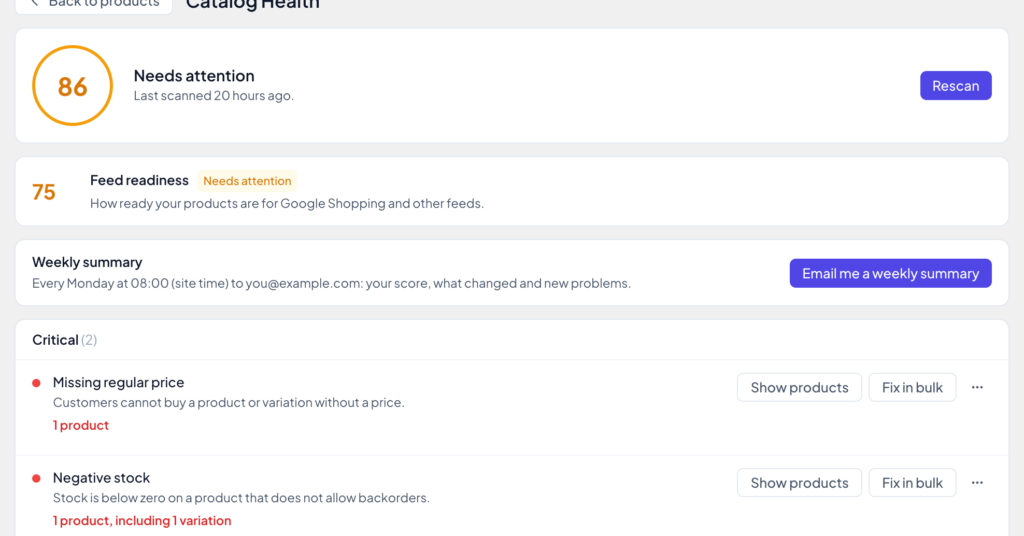
Version 1.6 adds Catalog Health. It checks your whole catalog for problems like these, gives it a score from 0 to 100, and fixes most of them in bulk, with a preview first. It’s in the free version. Pro adds checks for Google Shopping and other product feeds, and a weekly summary email.
What it checks
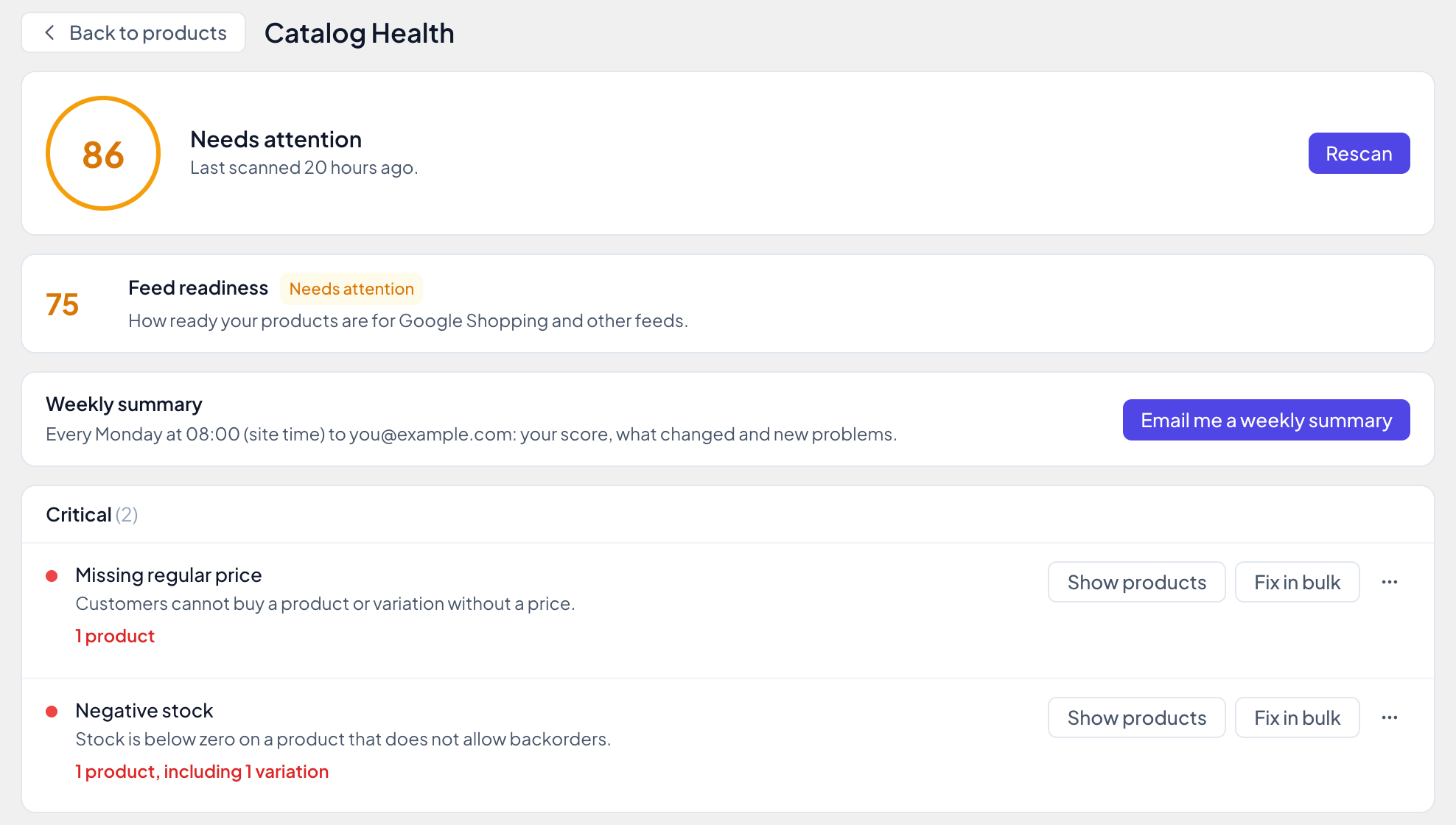
The free version runs 14 checks, grouped by how much they matter:
- Critical: missing regular price, negative stock, variable products without published variations, and sales that ended but still charge the sale price.
- Warnings: sale price not below the regular price, no product image, only in the default category, missing SKU, duplicate SKU, price is zero, no weight, stock managed but quantity empty, and empty description.
- Notice: empty short description.
The score weighs each problem by how serious it is and how many products have it. While any critical check finds something, the score stays below 90. A check that doesn’t fit your store, like zero prices for free samples, can be muted.
One check is worth running again after the sale: Sale ended but the price was not reverted. WooCommerce ends scheduled sales with a background task. If that task doesn’t run, customers keep paying the sale price, and nothing tells you. Catalog Health finds those products.
From problem to fix
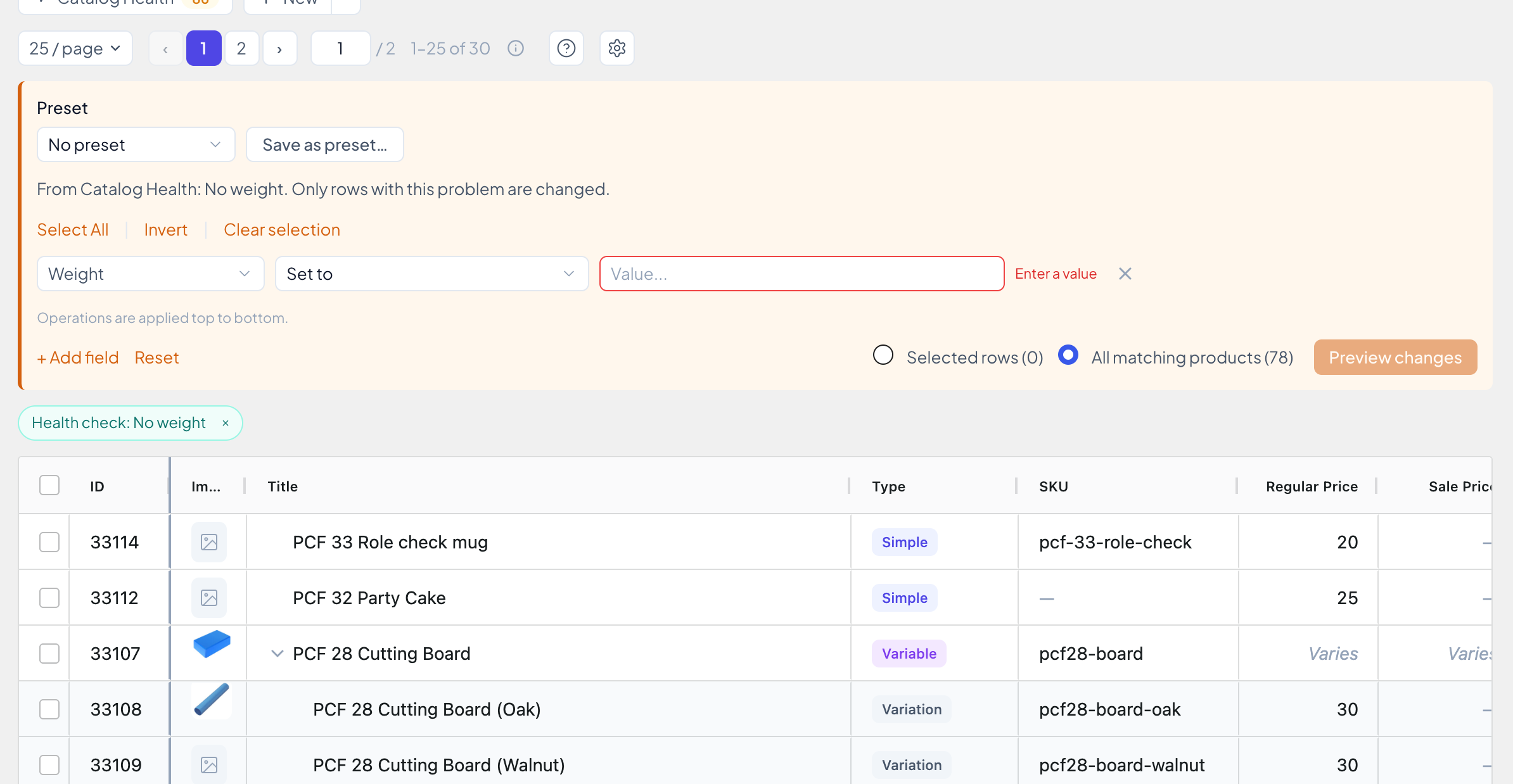
- Show products opens the grid with exactly the products that have the problem. A chip above the grid shows the check, and its × takes you back to your filters.
- Fix in bulk opens Bulk Edit with the fix filled in, for every product with the problem. Some fixes are complete, like “Set stock to 0” or “End the sale”. Others need a value only you know, like a price or a weight.
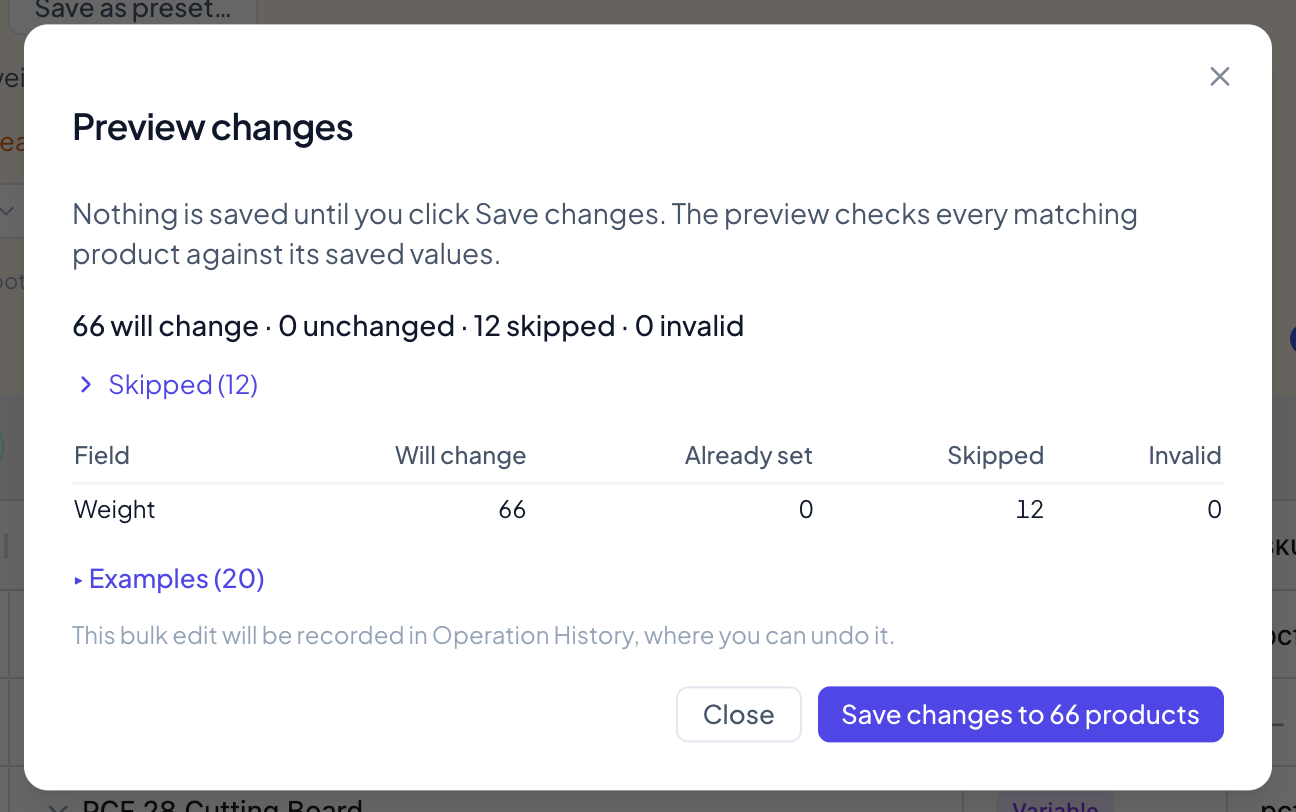
- Preview changes shows how many products will change and which are skipped, and why. Only products with the problem change. Nothing is saved until you click Save changes.
After the fix, the check is counted again, so you see the new number straight away.
There’s also a Catalog Health widget on the WordPress Dashboard, with your score and the three problems that matter most.
What Pro adds Pro
- Feed readiness. Five checks for Google Shopping and other feeds: missing GTIN, missing brand, titles over 150 characters, main images under 500 × 500 px (Google’s minimum from 31 January 2027), and variations with an “Any” attribute. Plus images without alt text, listed under SEO and accessibility. You get a Feed readiness score next to the catalog score.
- Weekly summary email. Every Monday at 08:00, your store is checked and you get a short email with your score, what changed since last week and any new problems. Your own site sends it.
- Watched views. Turn any saved view into your own check. Its products are counted with every scan and listed in the weekly summary.
- Generate SKUs. Fix in bulk on Missing SKU opens the SKU generator with a template filled in.
- Undo. A bulk fix is recorded in Operation History, so you can restore the old values in one go.
Every check, how the score works and what each fix does are in the Catalog Health guide.
Also new in 1.6
In Free and Pro:
- The Title filter has a match dropdown, like the SKU filter: Contains, Is exactly, Does not contain, Starts with and Ends with
- The Export dialog remembers the columns you picked last time, with a Reset link
- Keyboard shortcuts: Alt+F shows or hides Filters, Alt+B shows or hides Bulk Edit (⌥F and ⌥B on a Mac)
- Permanently deleting products shows live progress, can be cancelled partway, and works for more than 500 products at once
Pro only Pro
- Filter titles with a regular expression: pick “Matches regex” in the Title filter
- New {attr:…} tokens in the SKU generator, so {parent_sku}.{attr:size}.{attr:color} gives SHIRT.XL.Red
- Alt+P (⌥P on a Mac) opens Paste from Excel
Fixes worth knowing about:
- A price filter with 0 as its minimum or maximum showed every variation of a matching variable product. Now it shows only the variations at that price, and bulk edits and exports with that filter use the same rows.
- On shorter screens, like 1366×768 laptops, the grid could shrink to a sliver with Filters and Bulk Edit open. It now keeps room for about six rows.
- Keyboard shortcuts no longer act behind an open menu, cell popup or confirmation dialog.
The full list is in the changelog.
How to update
Free: go to Dashboard → Updates, or get it from WordPress.org.
Pro: the update shows up in Dashboard → Updates as well. Installing it needs an active license.
Then open WooCommerce → Catalog Health. The first scan starts on its own.
Black Friday: Pro yearly plans are 30% off the first year, and lifetime plans 15% off, until December 1.
See the plansIf Catalog Health finds something in your store you didn’t expect, or misses something it should catch, I’d like to hear about it. You can reach me through support.
Yas
Newsletter
Get new posts and plugin updates by email
Product updates, new guides and the occasional offer. No spam. Unsubscribe anytime.