
The fastest way to bulk edit thousands of WooCommerce products
WPMelon Advanced Bulk Edit for WooCommerce
The next generation of WooCommerce Advanced Bulk Edit (WCABE).
A spreadsheet-style editor for your WooCommerce catalog. Filter, edit, and save changes to thousands of products, variations, and prices without loading a single product page.
or download the free version from WordPress.org
From the makers of WooCommerce Advanced Bulk Edit – the original bulk editor trusted by 14,000+ stores for over 10 years.
WPMelon Advanced Bulk Edit is a complete rewrite. Built from scratch by the same team behind WooCommerce Advanced Bulk Edit with modern architecture and improved performance for large stores.
WPMelon Advanced Bulk Edit for WooCommerce lets you edit thousands of products in a spreadsheet-style interface.
Edit products the way you think about them – in a grid.
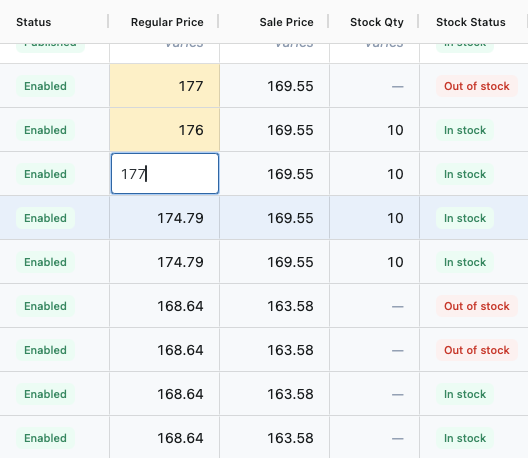
Click a cell. Type. Move to the next one. It works like Excel or Google Sheets, but it’s talking directly to your WooCommerce database.
- Inline editing for text, numbers, dropdowns, dates, and images
- Fill handle – drag a value down or up to apply it to multiple rows
- Changes are previewed before saving – nothing hits your database until you’re ready
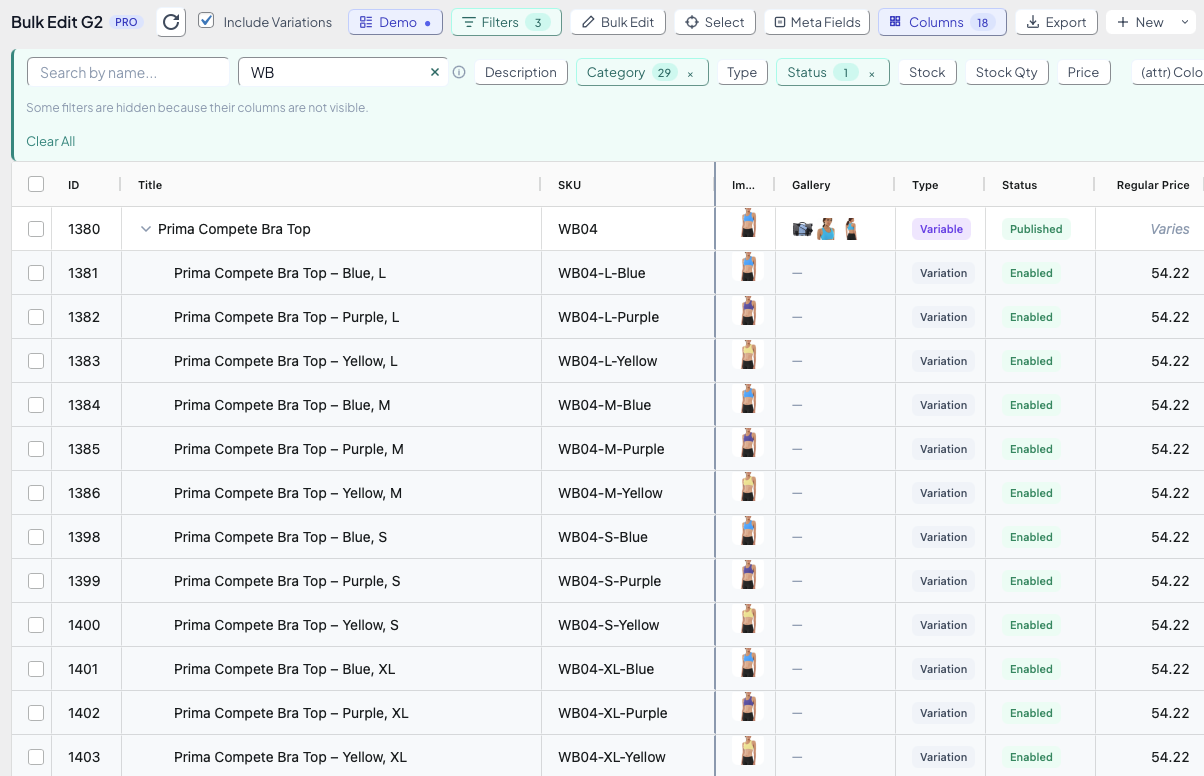
Find the 12 products you need out of 10,000 in seconds.
Combine filters for category, type, price range, stock status, attributes, tags, custom fields, and more. Save the combination as a view and switch back to it with one click.
- Stack multiple filters to narrow down exactly what you need
- Save filter + column combos as reusable views
- Filter panel only shows filters for visible columns
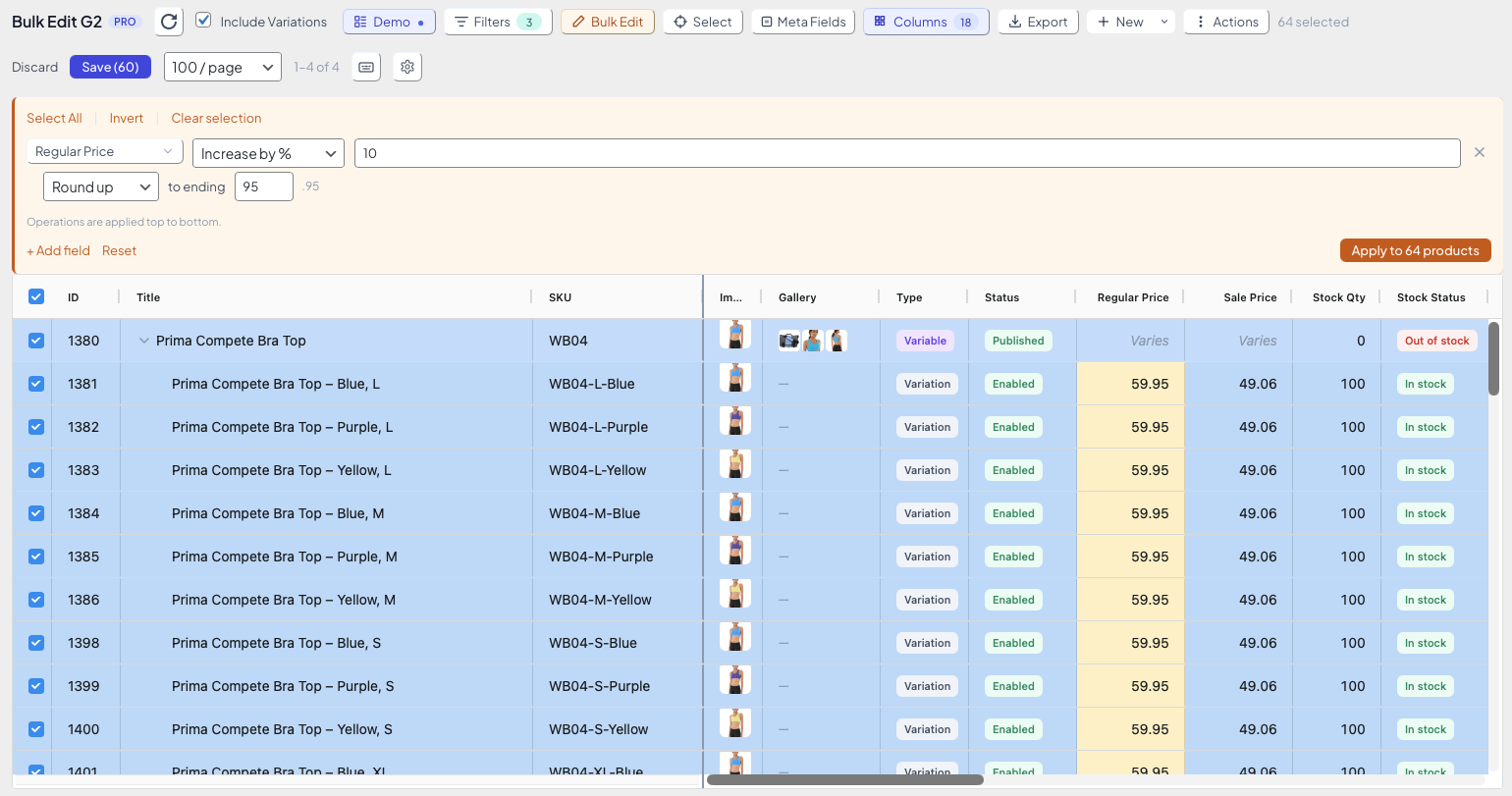
Change the price of 500 products by 10%? Three clicks.
Select products, pick an operation, preview the result, save. Works for prices, text fields, categories, tags, attributes, stock, and more.
- Increase or decrease prices by percentage or fixed amount
- Append, prepend, or find-and-replace text in any text field
- All changes previewed in the grid before saving
- Save a Bulk Edit setup as a preset and reuse it (Pro)
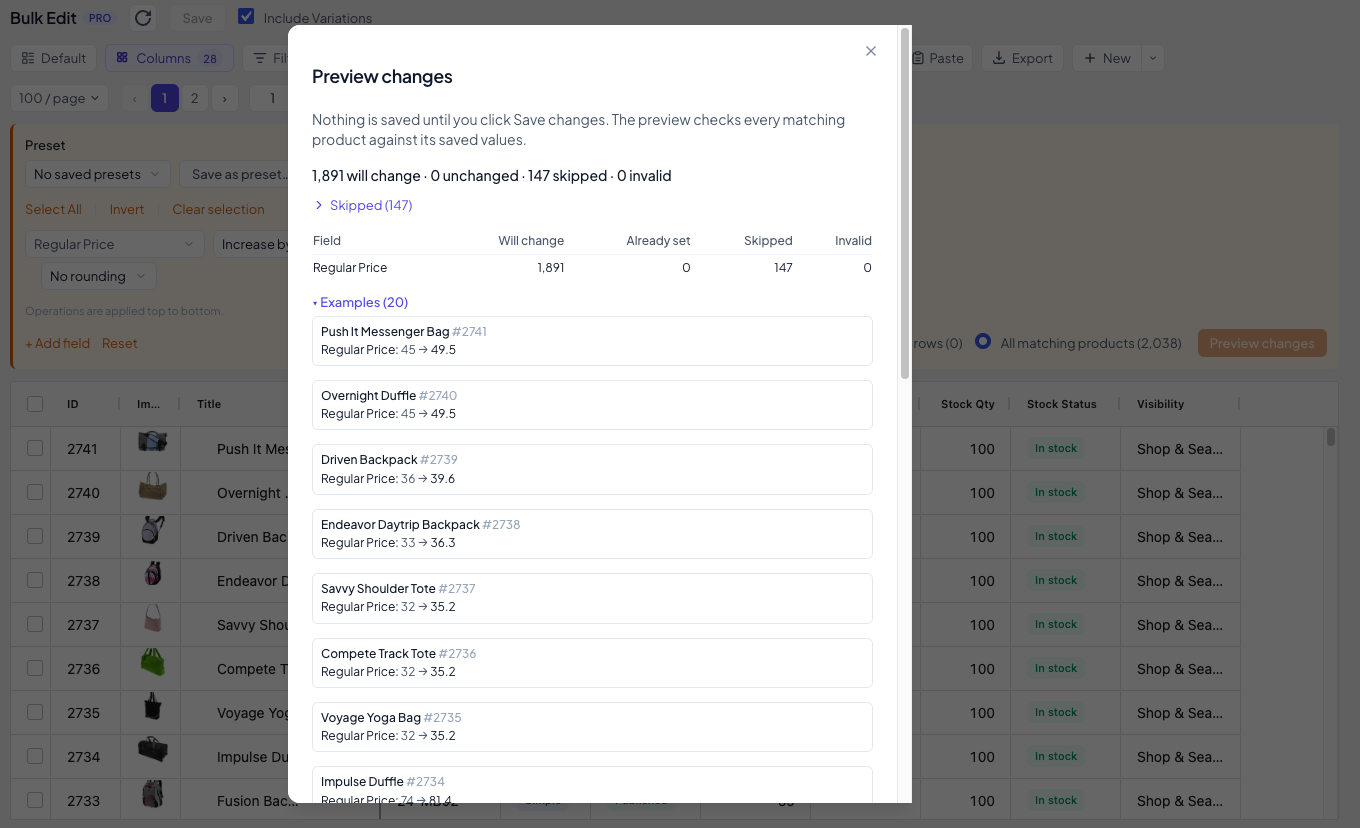
Edit every product that matches your filters, not one page at a time.
Instead of the selected rows, Bulk Edit can change every product that matches the current filters, across all pages. Preview the result first, then save.
- Filter the catalog, choose All matching products, and edit every product that matches
- Preview first: see how many products will change, and which are skipped or invalid and why. Nothing is saved until you click Save changes
- A progress bar shows while it saves, and it keeps going if you close the dialog. A bulk edit that stopped or that you cancelled can be resumed for 7 days
- Pro: works with price rounding, RegExp find & replace, the SKU generator and ACF / custom fields, shows before and after examples in the preview, and the whole edit lands in Operation History as one entry
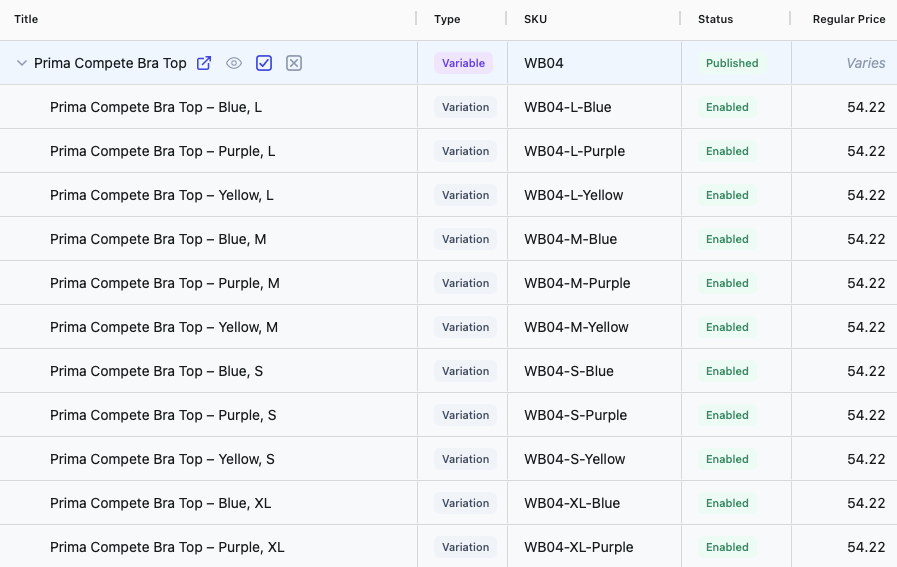
Variable products are first-class citizens, not an afterthought.
Expand any variable product to see all its variations inline. Edit variation prices, stock, images, and attributes right in the grid.
- Variations appear as child rows under their parent
- Edit variation fields inline – no popups, no page reloads
- Bulk operations work on variations too
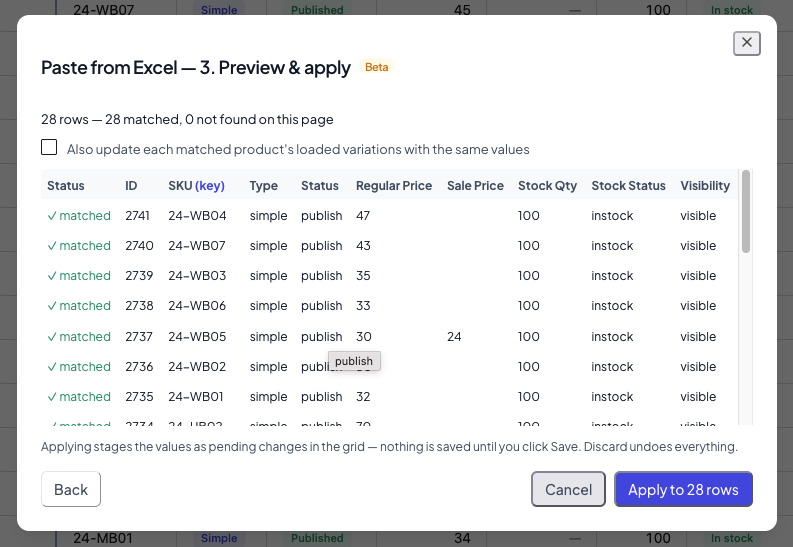
Supplier sent a price list? Paste it in – no CSV import.
Copy a block of cells from Excel or Google Sheets and paste it straight into the grid. Or open the Paste wizard, match rows to products by SKU or any other column, and update only the fields you mapped.
- Paste directly into selected cells – rows and columns land where you’d expect
- Paste wizard matches rows to products by SKU, ID, or any column you choose
- Every change is previewed in the grid before anything is saved
What you’ll actually use it for
Launch a new product line with 50+ variations
The Variation Wizard generates every size × color × material combination in one pass, then lets you set prices and stock inline – no clicking into each one.
Run a Black Friday sale across 500 products
Set sale prices and schedule start/end dates for a whole category in a few clicks. No spreadsheet imports, no CSV round-trips.
Clear out slow-moving inventory
Filter by stock level under 5, select all, and move them into a “Clearance” category in one pass.
Fix SEO issues across your catalog
Bulk update meta descriptions, product titles, slugs, and custom SEO fields to resolve audit findings without opening a single product page.
Migrate a supplier’s price list
Copy the supplier’s spreadsheet, paste it into the grid, and let the Paste wizard match each row to your products by SKU. Review the new prices in the grid, then save – no CSV export, no re-import.
Everything you need to bulk edit WooCommerce products at scale
Plus a lot more you didn’t know you needed.
Image management
Set featured images and manage galleries right from the grid. No more clicking into each product one by one.
Custom & meta fields
Import and edit any custom field or post meta. ACF (Advanced Custom Fields) support included.
Dark mode
Easy on the eyes during late-night catalog updates. Matches your system preference or toggle it manually.
Built for speed
Handles thousands of products without slowing down. Batched saving keeps your server happy even on shared hosting.
Column control
Show only the fields you need. Resize, reorder, and pin columns. Each view remembers its own layout.
Undo & rollback · Pro
Operation History records your bulk saves so you can review them later and restore previous values – with a field-by-field preview before anything is written back.
Paste from Excel · Pro
Paste a copied spreadsheet block straight into the grid, or use the Paste wizard to match rows to products by SKU or any column and update the mapped fields.
WPML support · Pro
Bulk edit multilingual catalogs. The editor follows WPML’s language switcher – lists, filters, saves, and exports all stay within the language you pick.
Free + Pro
A generous free version on WordPress.org. Pro unlocks undo & rollback, paste from Excel, WPML, meta fields, and more.
WPMelon Advanced Bulk Edit – Free vs Pro
The free version isn’t a teaser – it’s a real, useful tool. Pro adds the power features for stores that need to move fast.
| Feature | Free | Pro |
|---|---|---|
| Spreadsheet grid with inline editing | ✓ | ✓ |
| Filter by category, type, stock status | ✓ | ✓ |
| Advanced filters (price range, date, attributes) | ✓ | ✓ |
| Edit core fields (title, price, SKU, stock…) | ✓ | ✓ |
| Variation inline editing | ✓ | ✓ |
| Fill handle (drag to fill) | ✓ | ✓ |
| Dark mode | ✓ | ✓ |
| Column show/hide & reorder | ✓ | ✓ |
| Bulk operations (set, append, find & replace, deltas) | ✓ | ✓ |
| CSV export | ✓ | ✓ |
| Featured image & gallery management in grid | ✓ | ✓ |
| Product attributes editing | ✓ | ✓ |
| Scheduled sale prices | ✓ | ✓ |
| Automatic updates | ✓ | ✓ |
| Bulk category & tag assignment | ✓ | ✓ |
| Bulk duplication (up to 50 copies) | ✓ | ✓ |
| Saved views with filters & column layouts | ✓ | ✓ |
| Upsells & cross-sells editing | ✓ | ✓ |
| Cost of Goods (COGS) editing | ✓ | ✓ |
| Third-party product types (Bundles, Subscriptions…) | ✓ | ✓ |
| Bulk edit all matching products across all pages, with preview | ✓ | ✓ |
| Visual description editor | ✓ | ✓ |
| GTIN / UPC / EAN / ISBN editing and filter | ✓ | ✓ |
| Custom fields / post meta editing | ✗ | ✓ |
| ACF (Advanced Custom Fields) support | ✗ | ✓ |
| Custom taxonomy support | ✗ | ✓ |
| RegExp find & replace | ✗ | ✓ |
| Price rounding (.99, .95, .00 endings) | ✗ | ✓ |
| SKU generator (template-based bulk SKUs) | ✗ | ✓ |
| Bulk Edit presets | ✗ | ✓ |
| Edit all selected (one edit applied to every selected product) | ✗ | ✓ |
| Advanced selection (find duplicates, conditional rules) | ✗ | ✓ |
| Variation Wizard | ✗ | ✓ |
| Paste from Excel (column-matching Paste wizard) | ✗ | ✓ |
| Per-variation attribute editing | ✗ | ✓ |
| WPML / multilingual support | ✗ | ✓ |
| Operation history with undo / rollback | ✗ | ✓ |
| Priority support | ✗ | ✓ |
New here? Read the 5-minute getting started guide.
What store owners say
Real feedback from real WooCommerce stores.
“This is by far the best advanced bulk editor plugin out there.” We’re a high-scale store with 200,000 visits/month and we’ve been using it extensively. Reliable updates, reliable compatibility, while being insanely flexible and fast. My whole product team works with this tool.
“Brilliant support – saves us hours of time.” We have hundreds of product variations per product. Support is the best and quickest I’ve ever experienced. If you’re in the same situation – super recommend.
“Must-have for larger WooCommerce installations.” Especially with lots of products and variants. The features are insanely good and saved me time I could spend with my 3-year-old son instead of editing products.
“This plugin has saved me thousands of hours.” I run an online school. Every class is a product and I need to update them every quarter. Advanced Bulk Edit saves me tons of time.
Reviews from WooCommerce Advanced Bulk Edit users – WPMelon Advanced Bulk Edit is the next generation, built by the same team.
Black Friday deal opens November 10, in time to set up your store’s sale.
Get it 24 hours before everyone else.
Simple pricing. Pick a plan, start editing.
All plans include every Pro feature, updates, and priority support.
Backed by our 30-day money-back guarantee – try it risk-free.
- All Pro features
- 1 year of updates & support
- 30-day money-back guarantee
- All Pro features
- 1 year of updates & support
- 30-day money-back guarantee
- Best value for agencies
- All Pro features
- 1 year of updates & support
- 30-day money-back guarantee
- Perfect for dev shops & large agencies
Renewals stay at the price you paid, for as long as your license stays active.
Black Friday yearly prices cover the first year. Renewals are at the regular price, then stay locked while your license stays active.
All plans include every Pro feature. If your license expires, the plugin keeps working – you just won’t receive updates.
Looking for the free version? Download from WordPress.org →
Frequently asked questions
It is faster, more reliable, and optimized for stores with large product catalogs, including shops with thousands of products and variations.
The new plugin is released separately, so you can run it alongside the original WCABE and transition at your own pace.
ACF is supported for common field types, and support for additional ACF field types is being added in future releases.
Ready to stop editing products one by one?
Join 14,000+ WooCommerce store owners who already save hours every week.