
WPMelon Advanced Bulk Edit vs WP Sheet Editor
WP Sheet Editor (see their screenshots on WordPress.org) is a family of spreadsheet plugins for products, posts, orders, users and more. Advanced Bulk Edit focuses on products, and its free version edits variations, runs bulk edits and exports CSV.
Last checked:
The short answer
Both are spreadsheet-style editors that run inside your WordPress admin. The biggest difference is what each free version can do.
Choose WP Sheet Editor if
- You want spreadsheets for posts, pages, orders, coupons, users or the media library too, from one family of plugins.
- You want to export products to Excel or Google Sheets and import the changes back.
- You want formulas: math on any number field, or copying and combining fields.
Choose Advanced Bulk Edit if
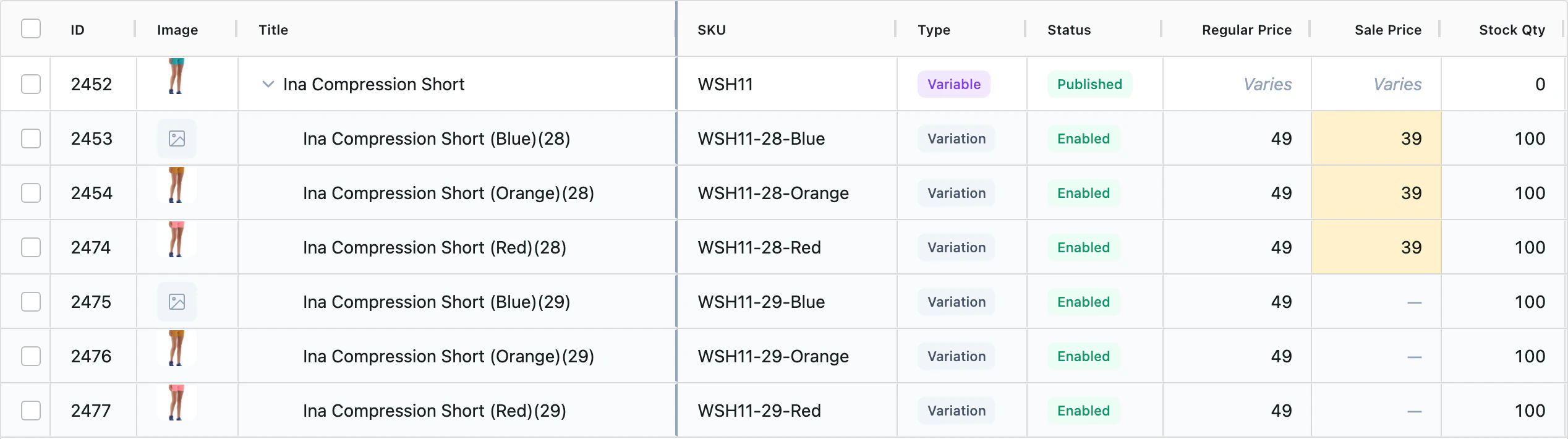
- You sell variable products: the free version edits variations, while WP Sheet Editor’s edits simple products only.
- You want bulk edits, categories, tags, images and CSV export without paying.
- Your work is the product catalog, and you want spreadsheet tools such as paste from Excel and Edit mode in Pro.
Feature by feature
Free next to free, paid next to paid. WP Sheet Editor’s paid product plugin is called WooCommerce Products Spreadsheet.
| Feature | WP Sheet Editor Free | WP Sheet Editor Premium | Advanced Bulk Edit Free | Advanced Bulk Edit Pro |
|---|---|---|---|---|
| Product types | Simple products only | YesAll types, including variable, external, subscription and membership products | YesAll WooCommerce types, plus types from other plugins such as bundles and subscriptions (common fields) | Yes |
| Variations in the grid | No | YesEdit, create in bulk and copy between products | YesChild rows under each parent | YesAdds per-variation attribute editing and bulk variation creation |
| Fields you can edit | Title, description, SKU, stock, stock status, regular and sale price, virtual. Other fields are shown read-only. | YesAll product fields, including gallery and attributes | YesPrices, stock, SKU, GTIN, descriptions, categories, tags, attributes, shipping class, images and gallery, upsells and cross-sells, and more | YesAdds custom fields, ACF and custom taxonomies |
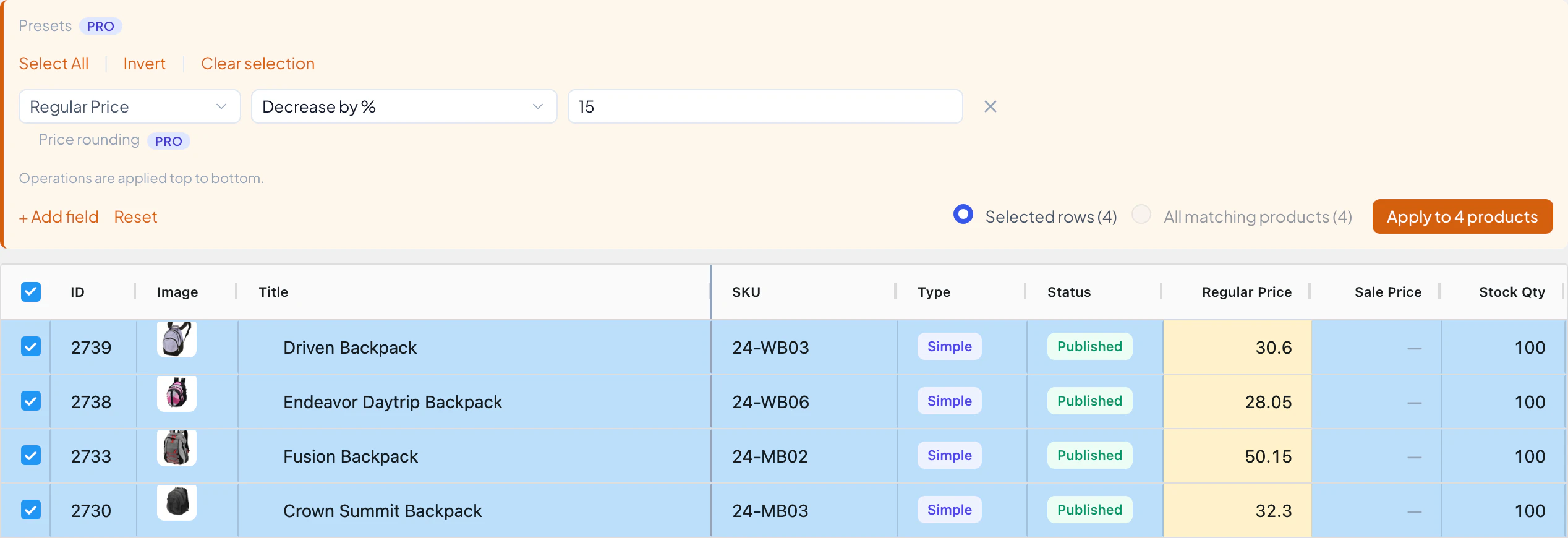
| Bulk edit across many products | NoNo formulas. You can copy values from one product to another. | YesFormulas: math on any number field, search and replace, copy or combine fields | YesSet, increase or decrease by % or amount, find and replace, append, prepend | YesAdds regex find and replace, price rounding and SKU templates |
| Custom fields and ACF | No | YesDetected automatically, including ACF | No | YesDetected automatically, including ACF (common field types). You choose which to show. |
| Search and filters | By keyword and author | YesAny field, any operator, several conditions | YesCategory, tags, type, stock, price, SKU, attributes, dates and more | YesAdds custom field, ACF and custom taxonomy filters |
| Export to CSV | No | YesExport, edit in Excel or Google Sheets, import back | YesEvery column in your view | YesAdds custom field, ACF and taxonomy columns |
| CSV import of products | No | Yes | No | No CSV import. Paste from Excel updates existing products. |
| Posts, orders, coupons, users and other content | No | Separate spreadsheet plugins, sold one by one or in the All Plugins plan | No | No |
| Scheduled exports, imports and bulk edits | No | Automations extension, sold separately | No | No |
| Entry price | Free | $99.98/yr for 1 site | Free | $69/yr for 3 sites |
WP Sheet Editor details are from its WordPress.org page and wpsheeteditor.com, checked on the date at the top. Rows we could not confirm for both of its editions are left out. The sources are listed at the end of this page.
Prices
Both have a free version on WordPress.org. Both paid versions sell yearly and lifetime licences.
WooCommerce Products Spreadsheet
Free version: WP Sheet Editor Free
Yearly
- 1 site$99.98/yr$99.98 per site per year
- 2 sites$119.98/yr$59.99 per site per year
- 5 sites$239.98/yr$48 per site per year
- Unlimited sites$399.98/yr
Lifetime
- 1 site$239.98
- 2 sites$299.98
- 5 sites$599.98
All Plugins plan
- Unlimited sites, lifetime$499Every WP Sheet Editor spreadsheet plugin
Advanced Bulk Edit Pro
Free version: Advanced Bulk Edit Free
Yearly
- 3 sites$69/yr$23 per site per year
- 10 sites$129/yr$12.90 per site per year
- 25 sites$229/yr$9.16 per site per year
Lifetime
- 3 sites$249
- 10 sites$449
- 25 sites$799
What one store pays per year: Advanced Bulk Edit Pro $69 (3-site plan) WooCommerce Products Spreadsheet $99.98 (1-site plan)
What five stores pay per year: Advanced Bulk Edit Pro $129 (10-site plan, the smallest that covers 5) WooCommerce Products Spreadsheet $239.98 (5-site plan)
Regular prices in US dollars, as listed on wpsheeteditor.com and wpmelon.com on the date at the top of this page. On that date, wpsheeteditor.com offered 50% off every WooCommerce Products Spreadsheet plan and $100 off the All Plugins plan. Each plugin’s own site has the current price. Advanced Bulk Edit pricing
Where WP Sheet Editor is the better choice
If any of these is the main reason you’re looking, WP Sheet Editor is the better fit.
A spreadsheet for every kind of content
Separate plugins edit posts and pages, orders, coupons, customers, users, the media library, categories and attributes, events, courses and more. Buy the ones you need, or all of them in the All Plugins plan.
Excel and Google Sheets round trip
Export products, edit them in Excel or Google Sheets, and import the changes back, including stock and prices from a supplier’s CSV. Paid plugin only.
Formulas
Do math on any number field, copy one field into another, or combine two fields into a third, across hundreds of products. Paid plugin only.
Add-ons for more jobs
An Automations extension schedules exports, imports and bulk edits, a front-end editor lets your team edit outside wp-admin, and Google Sheets sync and an AI assistant are separate services. The paid plugins also support WPML and Polylang.
Where Advanced Bulk Edit is the better choice
If your work is the product catalog, these are the differences you’ll notice.
The free version is a real tool
Every product type and its variations. Bulk price changes by percentage or amount, find and replace, append and prepend, bulk categories and tags, images and galleries, saved views, and a CSV export of every column in your view.
Variations inline
Expand a variable product and edit its variations as child rows. Sorting keeps every variation under its parent.
Built for large catalogs
A virtualized grid that draws only the rows on screen, sorting that orders the whole catalog across pages, and page sizes up to 10,000 products.
Spreadsheet tools in Pro PRO
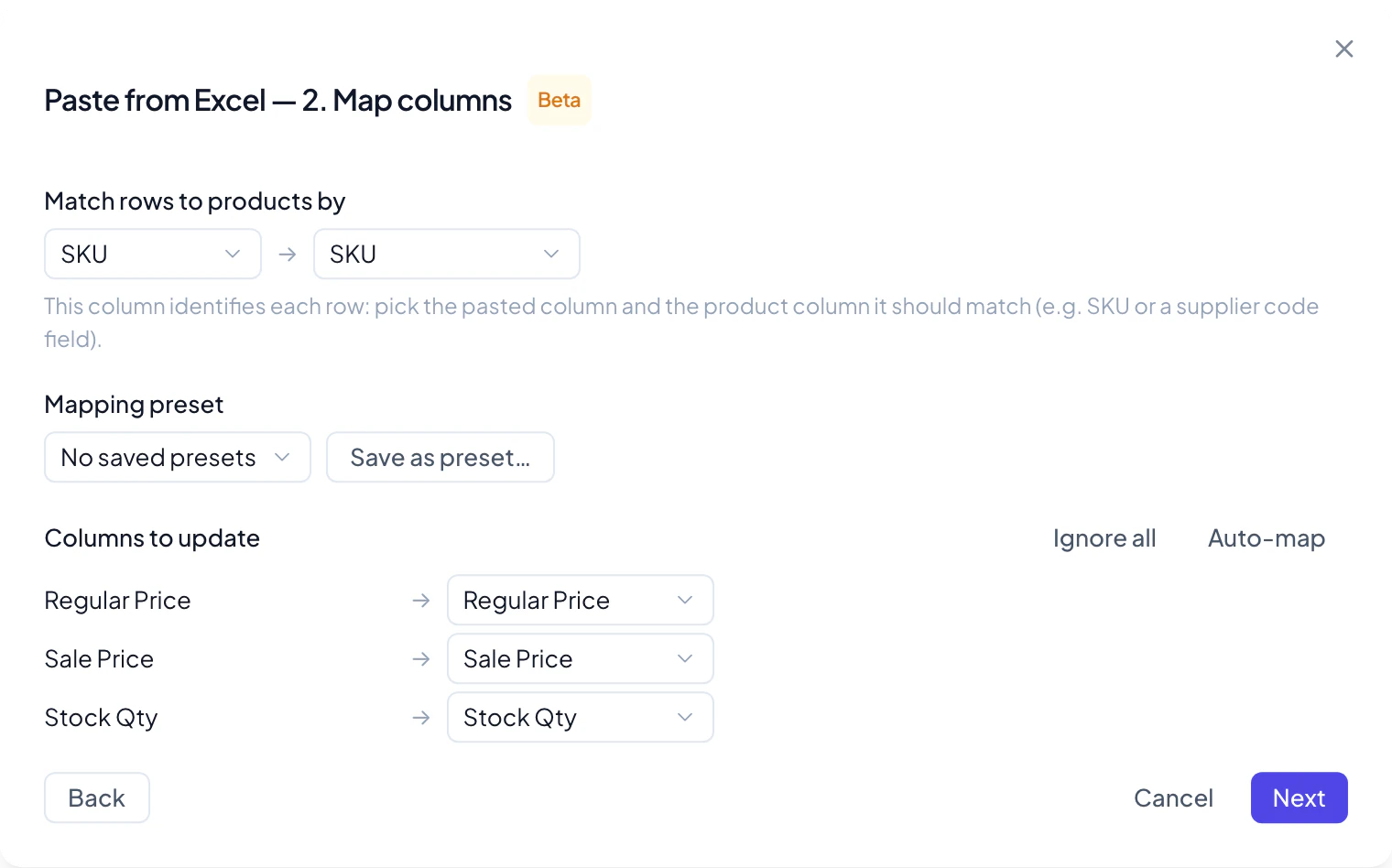
Paste from Excel or Google Sheets, Edit mode (one cell edit applied to every selected product), saved Bulk Edit presets, and Operation History to restore values after you save. Operation History is off until you turn it on.
Every edit through WooCommerce
Saves go through WooCommerce’s own product code, the same path the product editor uses, so hooks fire, caches clear and your other plugins stay in step.
WooCommerce bulk editing since 2014
From the makers of the original WooCommerce Advanced Bulk Edit, trusted by 14,000+ stores. This is its complete rebuild.
Switching from WP Sheet Editor
Both plugins edit the same WooCommerce products, so there’s nothing to migrate: no export, no import, no sync.
Install the free version next to WP Sheet Editor. Both can stay active while you compare.
Open WooCommerce → Bulk Edit and try it on your own catalog: filter, edit a few prices, save.
Set up your views. Save the filters and columns you use as views, so each one comes back in one click.
New to the plugin? The getting started guide takes about five minutes, and the rest of the docs cover prices, variations and spreadsheets.
Questions
Is Advanced Bulk Edit a WP Sheet Editor alternative?
For WooCommerce products and variations, yes. Both edit products in a spreadsheet-style grid inside your WordPress admin. WP Sheet Editor also sells spreadsheets for posts, orders, users and other content; Advanced Bulk Edit edits products only.
What does WP Sheet Editor’s free version cover?
Simple products only. It edits the title, description, SKU, stock, stock status, regular and sale price and the virtual setting, shows the other fields read-only, and can create products. Variations, formulas, custom fields, export and import come with the paid plugin.
Can Advanced Bulk Edit edit posts, orders or users?
No. It edits WooCommerce products and their variations only, in both the free version and Pro. For posts, orders, coupons or users, WP Sheet Editor has a separate spreadsheet for each.
How do the prices compare?
Advanced Bulk Edit Pro is $69 a year for 3 sites. WP Sheet Editor’s WooCommerce Products Spreadsheet lists at $99.98 a year for 1 site and $119.98 for 2; on the date we checked, its site offered 50% off every plan. Both also sell lifetime licences.
Is Advanced Bulk Edit free?
Yes. The free version is on WordPress.org, with no cap on inline edits, bulk edits across many products, saved views and CSV export. Pro adds paste from Excel, Edit mode, Bulk Edit presets, Operation History, custom fields and ACF, WPML and more.
Can I use both plugins on the same site?
Yes. They edit the same WooCommerce products and keep their own settings, so you can run them side by side while you compare, then deactivate the one you don’t need.
Sources
Every WP Sheet Editor detail on this page comes from these pages, checked on the date at the top. If something has changed, tell us and we’ll correct it.
Try it free on your own catalog
Install the free version from WordPress.org, open WooCommerce → Bulk Edit, and edit your first products in a few minutes.